


-
A
1) Click on [Register] at the top of the homepage, then select either 'Learners' or 'Teachers' membership, and agree to the terms of service and the collection and use of personal information to complete the registration.
2) In the member information input stage, enter the email address you want to use as your ID and click [Certify].
3) Once you enter the authentification number sent to your email, the verification is complete. After entering your personal information, click [Sign Up].
-
A
If you do not receive an email after clicking the 'Getting the authentication' button during registration, please check your spam folder.
There may be a delay of 3 to 5 minutes in receiving the email depending on your PC's network environment.
For any further inquiries regarding email verification, please contact online1@ksif.or.kr.
-
A
Please enter a combination of letters, numbers, and special characters with a minimum of 8 characters.
* Allowed special characters: ! @ # $ % ^ & * ( ) _ +
-
A
· ID: On the login screen, click [Forgot your ID or password?] at the bottom, enter your name, nationality, and date of birth, and then click 'Find ID' to receive the ID confirmed with the information provided.
· Password: On the login screen, click [Forgot your ID or password?] at the bottom, enter your ID (email address), and then click 'Temporary password sent'. A temporary password email will be sent to your email address.
After logging in with the temporary password, please change your password in [My Class] > [My Account].
-
A
If you send your ID (email) information to online1@ksif.or.kr, we will check your account and provide assistance.
-
A
Please check the 'Online KSI Opening Schedule' on the Online King Sejong Institute website for the annual and semester schedules.
-
A
Please refer to the information on the levels and structures of each course type.
1. Lecture Assisted Type
1) Course Levels
King Sejong Institute Korean Introductory/Beginner/Intermediate/Advanced, Business Korean
2) Course Structure
◎ King Sejong Institute Korean Introductory
Online content (VOD) + 5 live video lectures
◎ King Sejong Institute Korean Beginner/Intermediate/Advanced
Online content (VOD) + 10 live video lectures + 2 assignments feedback + achievement
◎ Business Korean
Online content (VOD) + 10 live video lectures
2. Learning Assisted Type
1) Course Levels
King Sejong Institute Korean Beginner/Intermediate/Advanced
2) Course Structure
Online content (VOD) + 3 live video lectures + 2 assignments feedback + 8 self-directed
3. Self-learning Type
1)Course Levels
King Sejong Institute Korean Introductory/Beginner/Intermediate/Advanced, Business Korean
2) Course Structure
Online content (VOD)
-
A
The Online King Sejong Institute conducts student recruitment on a first-come, first-served basis.
In '0/20', the '0' indicates the number of available spots, while '20' represents the total capacity.
Therefore, the number of available spots must be displayed as 1 or more for course registration to be possible.
If any current students cancel their enrollment, there may be available spots, so please check for any openings.
-
A
[Course Cancellation]
Log in to the Online King Sejong Institute (www.iksi.or.kr) > My Classroom > My Courses > Cancel Course
[Course Change]
Cancel the existing course application > Select a new course > Check for available spots > Apply for the course
※ The "Lecture Assisted Type and Learning Assisted Type" can only be canceled or changed within a specified period, and only one course can be applied for per account.
-
A
Course approvals will be processed sequentially until one day before the start of the course after the registration deadline.
If your status remains unapproved after the start date, please contact the following:
(Contact) onse1@ksif.or.kr, +82-2-6970-5000
-
A
For Self-learning type, it is possible.
However, for lecture-based type and assignment-based type courses, only one class per account can be taken each semester.
-
A
You can receive recommendations for Korean language courses suited to your level by going to Online King Sejong Institute > Online KSI Info > curriculum.
-
A
Please check the courses listed under 'Wating' in My Class after logging into the Online King Sejong Institute.
-
A
Please try again after changing your internet settings as follows.
If the problem persists after taking these steps, please leave your contact information at online1@ksif.or.kr for remote support.
[Chrome]
- Settings > Privacy and Security > Clear browsing data (delete browsing history, cookies, cache, etc.)
[Edge]
- Settings > Cookies and Site Permissions > Cookies and Site Data > Manage and Delete Cookies and Site Data > View all cookies and site data > Remove all
-
A
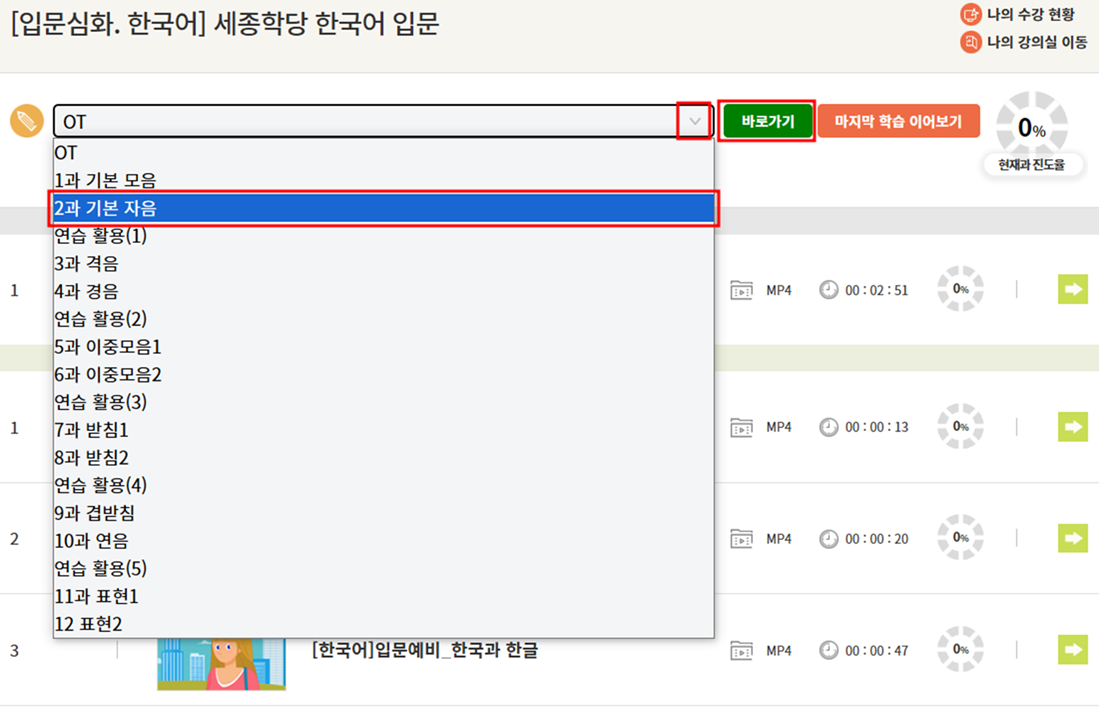
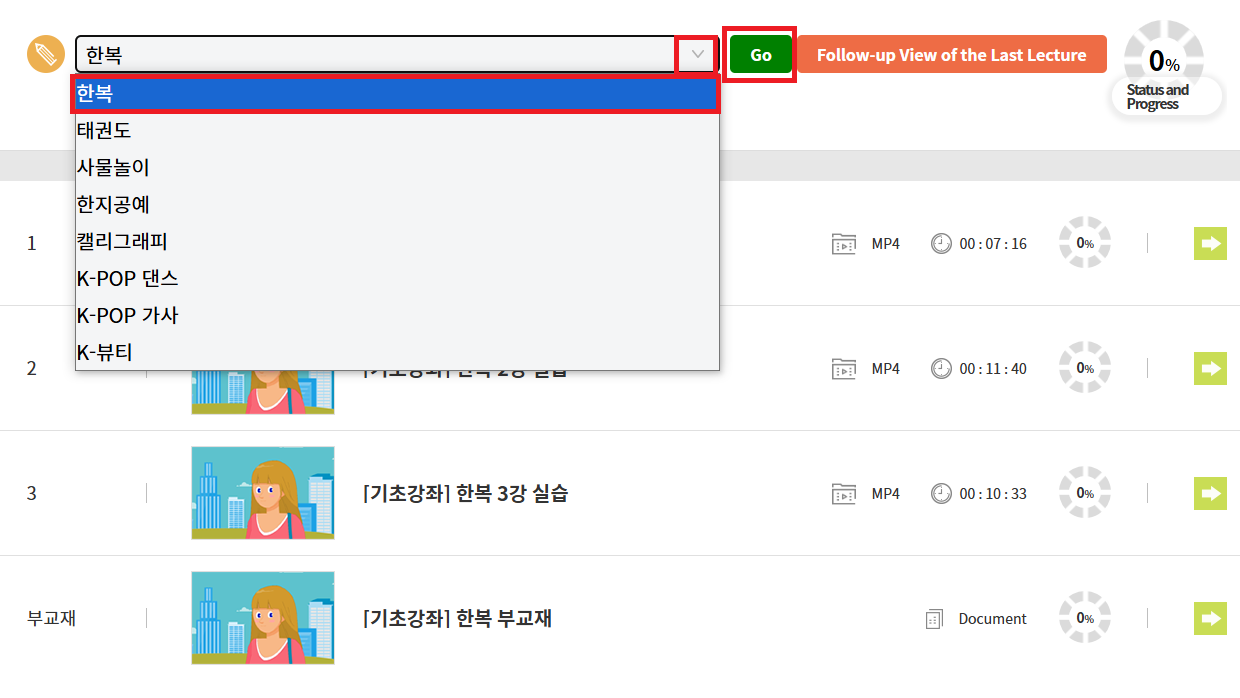
Please select the next section as shown on the screen and click [Go].
-
A
Go to My Class > Move to the Course My Class > Enter the Video Lecture menu to check the weekly lecture list. The [Enter] button will appear 30 minutes before the class starts.
-
A
Please contact the teacher via the email provided in the "Inquiries and reference materials" within the classroom.
-
A
Please try again after changing your internet settings as follows.
If the problem persists after taking these steps, please send your user ID, course name, and assignment file to online1@ksif.or.kr.
[Chrome]
- Settings > Privacy and Security > Clear browsing data (delete browsing history, cookies, cache, etc.)
[Edge]
- Settings > Cookies and Site Permissions > Cookies and Site Data > Manage and Delete Cookies and Site Data > View all cookies and site data > Remove all
-
A
Please try again after changing your internet settings as follows.
If the problem persists after taking these steps, please send your user ID, course name, and assignment file to online1@ksif.or.kr.
[Chrome]
- Settings > Privacy and Security > Clear browsing data (delete browsing history, cookies, cache, etc.)
[Edge]
- Settings > Cookies and Site Permissions > Cookies and Site Data > Manage and Delete Cookies and Site Data > View all cookies and site data > Remove all
-
A
If you still can't hear the sound after trying a different device, browser, or internet environment, please send your user ID, course name, and exam information (exam name, question number, etc.) to online1@ksif.or.kr.
We will contact you after checking with the system administrator.
-
A
Please contact the teacher's email listed in the "Inquiries and reference materials" within the classroom to inquire about the possibility of retaking the exam.
-
A
Once the instructor has completed grading, you can check your score in My Classroom > Exam menu.
If it has been 10 days since the exam period ended and your score is still ungraded, please contact the following:
(Contact) onse1@ksif.or.kr, +82-2-6970-5000
-
A
Certificates of completion are issued upon completion of the Beginner, Intermediate, and Advanced Lecture Assisted type courses.
No certificates are provided for any other courses, even if the completion requirements are met.
-
A
Please refer to the detailed criteria for issuing certificates of completion and confirmation of attendance
1) Certificate of Completion
- Lecture Assisted Type (King Sejong Institute Korean Beginner, Intermediate, Advanced)
Online(VOD) progress rate 70%, live video lecture attendance rate 70%, 60 points or more on 2 assignments, 70 points or more on the exam
2) Confirmation of Attendance
- Lecture Assisted Type(King Sejong Institute Korean Beginner, Intermediate, Advanced, Business Korean)
Online(VOD) progress rate 70%, live video lecture attendance rate 70%, 60 points or more on 2 assignments
- Lecture Assisted Type (King Sejong Institute Korean Introductory)
Online(VOD) progress rate 70%, live video lecture attendance rate 70%
- Learning Assisted Type(King Sejong Institute Korean Beginner, Intermediate, Advanced)
Online(VOD) progress rate 70%, 60 points or more on 2 assignments
-
A
You can print your certificate of completion/Confirmation of Attendance in My Class > Certificate menu or My Page > My Online KSI certificate.
However, printing is not supported in a mobile environment, so please access it via a PC web browser.
-
A
The King Sejong Institute certificate of completion as proof of Korean language proficiency is only recognized if it is issued by local institutes (offline institutes) abroad.
The Online King Sejong Institute certificate is not recognized.
You can find information about offline institutes on the 'King Sejong Institute Foundation website > Business Section > King Sejong Institutes Around the World.
(King Sejong Institutes Around the World: https://www.ksif.or.kr/ste/ksf/hkd/lochkd.do?menuNo=20101800)
-
A
· For the course materials of the Online King Sejong Institute,
Log in to Nuri King Sejong Institute (nuri.iksi.or.kr) > Learners > Textbooks menu to access e-books or PDFs, as well as listening materials.
· For materials provided by the teachers of the Online King Sejong Institute, please contact the respective teachers directly.
If you have any questions regarding finding and using the materials, please contact online1@ksif.or.kr.
-
A
The Korean level test is an exam that allows prospective King Sejong Institute learners and Korean language learners worldwide to assess their Korean language proficiency online.
You can take the test anytime and anywhere using a computer or mobile device, and you can immediately check your results to receive recommendations for Korean learning content that suits you.
Path to the Korean level test : Log in to the Online King Sejong Institute (www.iksi.or.kr) > Online KSI Info > Click on Korean level test.
(Shortcut: https://leveltest.iksi.or.kr/exam/leveltest/app.do)
The test is divided into beginner and intermediate levels, with each test consisting of listening and reading sections.
After the level test, you can retake a test of a different level immediately, but you can only take a test of the same level again after 2 months, so please keep this in mind.